Gently: a local console for agent sessions
A local dashboard for multitasking with AI agents. Monitor and search Claude, Codex, Gemini, and OpenCode sessions in one place, and resume them live across a split-pane workspace.
Oblivios/GentlyA dashboard for multitasking with AI agents. Monitor and search conversation history across Claude, Codex, Gemini, and OpenCode in one place. Resume or start sessions live, and run multiple agents in parallel across a split-pane workspace, without switching between terminals.
Works on Linux and WSL (Ubuntu), not tested on macOS.
Run
git clone https://github.com/Oblivios/gently.git
cd gently
python3 app.py
Open http://127.0.0.1:8765. The TUI dashboard takes the foreground; the HTTP server runs in a background thread. Ctrl+C exits.
Requirements: Python 3.10 or later, plus tmux for resume and new-conversation. The browser-side libs (marked, dompurify, highlight.js, xterm) load from a CDN.
LAN access (phone or tablet)
To reach Gently from another device on the same network, bind to all interfaces:
python3 app.py --host 0.0.0.0Then open http://<your-machine-ip>:8765 from your phone or tablet. Find your LAN IP with hostname -I or ip addr.
Remote access modes
By default, all clients (local or remote) have full access. Use one of these flags to restrict what remote (non-localhost) users can do:
| Flag | What remote users can do |
|---|---|
| (none/default) | Full access, same as --trust |
--trust | Full access (explicit) |
--view-all | Browse and read all sessions; no terminal interaction or new conversations |
--view-only | See only the sessions currently open on the host; no terminal interaction |
Remote viewers in read-only modes see a small lock badge in the corner. View-only clients automatically sync their session list from the host every 10 seconds.
When --view-only or --view-all is active, Gently generates a persistent owner token (~/.config/gently/owner.key) and displays an auth URL in the TUI. Open it once in the browser you use to run Gently; the server sets a 30-day cookie and from then on recognises that browser as the owner regardless of which IP the connection comes from. This matters on WSL2, where Windows’ localhost port-forwarding makes your local browser and remote devices appear to arrive from the same gateway IP, so the cookie is the only reliable way to tell them apart.
TUI dashboard
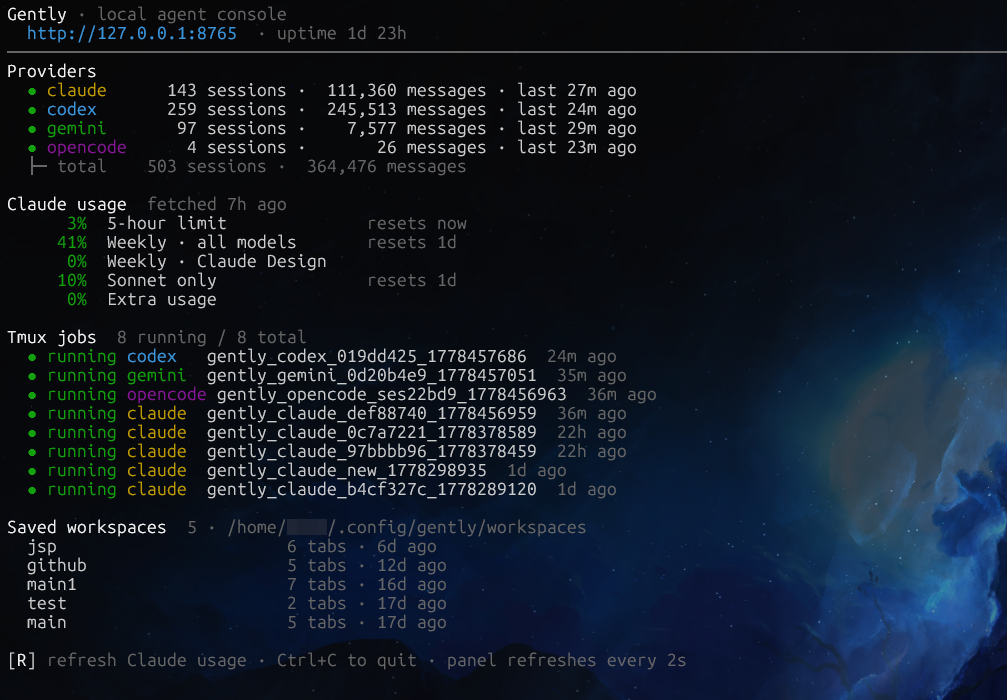
python3 app.py shows a foreground terminal dashboard. It displays per-provider session counts and most-recent activity, Claude /usage (5-hour and weekly limits, resets, percentages), saved workspace names, running tmux jobs, and server uptime. Press R to refresh Claude usage; Ctrl+C exits and stops the server.
Sidebar
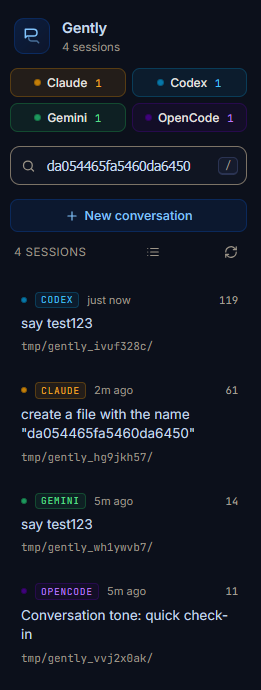
Four provider chips at the top (Claude, Codex, Gemini, OpenCode) toggle a provider on or off; at least one must stay active, and each chip shows its session count.
Type to search across all sessions. Single-word queries use prefix matching (fast finds fastapi); multi-word queries use phrase matching. The search runs two passes: a substring filter on session summary, project path, and id, and a full-text FTS5 query against an indexed copy of every session’s message bodies. Results are unioned and sorted by recency. The index is built on first search (~/.config/gently/index.sqlite); a cold pass over hundreds of sessions takes about 80 seconds, subsequent searches under 200ms.
Each session card shows a provider badge, relative timestamp, summary, message count, and project path. Keyboard navigation works from anywhere:
| Key | Action |
|---|---|
/ | Focus the search input and select all |
↑ / k | Move cursor up |
↓ / j | Move cursor down |
Enter | Open the highlighted session in the focused pane |
Double-click a session summary to rename it inline (stored in localStorage). The icon next to the session count toggles between recency (flat list) and project (grouped under the working directory). Drag the thin strip between sidebar and workspace to resize it, double-click to reset.
Workspace and panes

The workspace is a binary tree of panes split horizontally or vertically. Each pane has its own tab strip and controls.
- Splitting. The split buttons in the pane controls split right or down. The new pane is empty and focused; ratios start at 50/50.
- Resizing. Drag the resizer handle between two panes. The ratio is bounded between 12% and 88% and saved on release.
- Swapping. Drag a pane header onto another pane to swap their positions. Sizes stay put; only the content moves, and active xterm sessions survive without flickering.
- Closing. The X button closes the pane (disabled when it’s the only one); the sibling subtree collapses into the space.
- Focus. Click anywhere in a pane to focus it. New sessions from the sidebar open in the focused pane.
Each pane has tabs. Click to activate, middle-click or the × to close. Double-click a tab label to rename it inline. Drag a tab from one pane and drop it on another to move it.
| Button | Action |
|---|---|
| ↑ prev-prompt | Jump to the previous user message |
| ↓ next-prompt | Jump to the next user message |
| 🔍 search | Toggle per-pane search bar |
| ⇅ expand | Expand or collapse all tool-call blocks |
| ⌨ terminal | Resume or detach the tmux session for the active tab |
| VS Code | Open the conversation’s working directory in VS Code |
| ⧉ copy-resume | Copy the resume command for the active session |
| M copy-md | Copy the full conversation as Markdown |
| ▣▣ split right | Split the pane side by side |
| ▤ split down | Split the pane top or bottom |
| × close | Close this pane |
Conversations
Each session opens in a pane and loads the latest 500 messages. A Load earlier button fetches the previous 500; Load full conversation fetches everything in one pass.
Hover any user or assistant bubble to reveal a copy icon. Screenshots pasted into Claude or Codex sessions render as thumbnails and open in a fullscreen lightbox. Tool calls and thinking blocks are collapsed by default inside <details>; the pane’s expand-all toggle opens them all at once. Diffs render with syntax highlighting when the tool result carries a structured patch. A circular scroll-to-bottom button appears when you scroll away from the latest messages.
tmux and live terminal
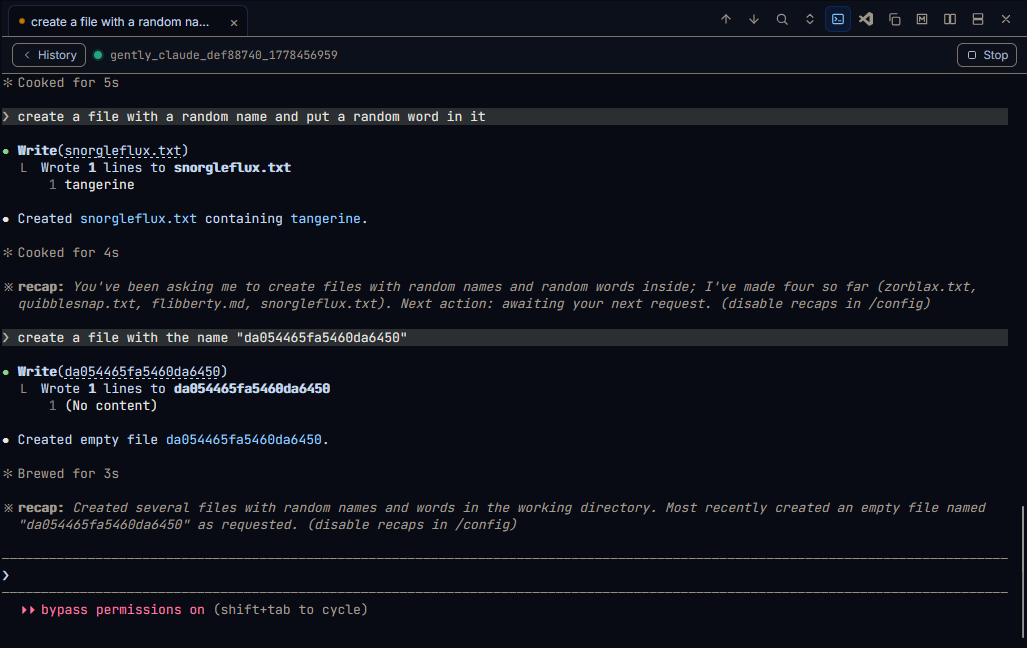
Click the terminal button on any tab that has a session ID. Gently POSTs to /api/tmux/start, which starts a detached tmux session running the provider’s resume command (claude -r <id>, codex resume <id>, opencode -s <id>), and opens an EventSource that streams the output into an xterm.js canvas.
Each tab carries its own terminal state, so two tabs in the same pane can each have their own running tmux session. Sessions survive server restarts: a sidecar JSON file at /tmp/gently_tmux_logs/<session>.meta.json lets Gently match the running tmux session back to its (provider, session_id) on reconnect, so re-clicking the terminal button reattaches instead of spawning a new one. The History button detaches (the tmux session keeps running); Stop kills it. Keystrokes are coalesced: characters typed while a previous POST is in flight are buffered and sent in the next request.
When resuming a Claude session, a dialog asks whether to launch with --dangerously-skip-permissions.
New conversation
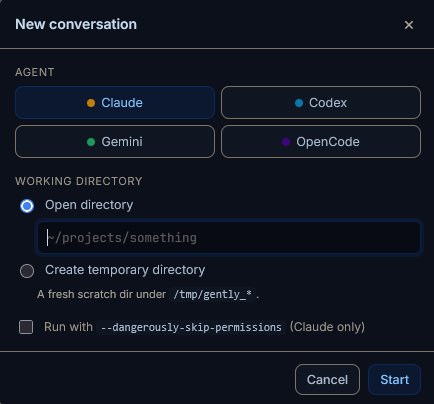
Click + New conversation in the sidebar (or Ctrl+K). Pick an agent, then either type a directory or select Create temporary directory (the server runs tempfile.mkdtemp(prefix="gently_")). The conversation opens as an ephemeral tab with no session ID yet; after the agent writes its first session file, refresh the sidebar to find it.
Command palette
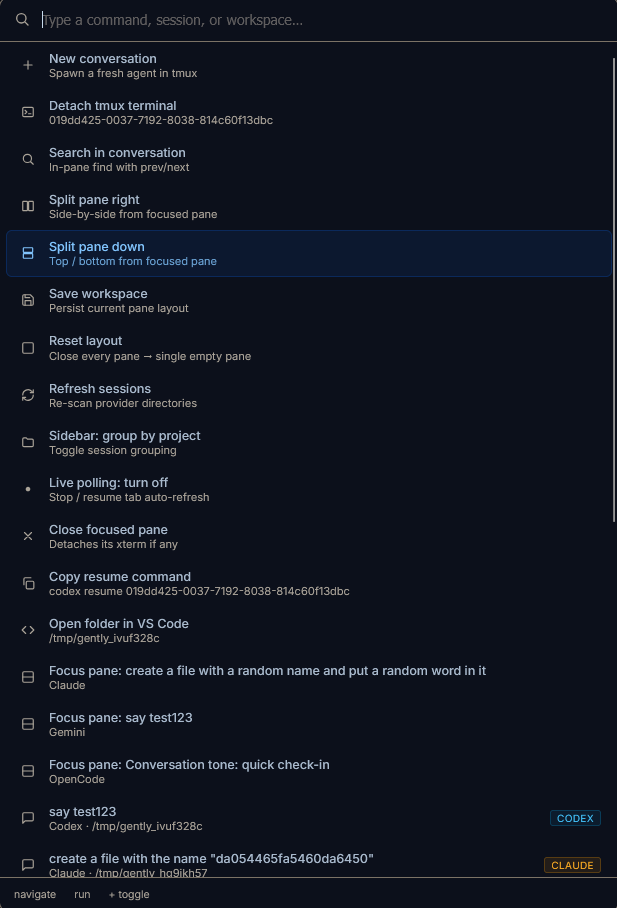
Press Ctrl+K (or Cmd+K) to open the palette. Type to filter; scoring goes contiguous substring match, then prefix, then subsequence in the label, then subsequence in the subtitle. It indexes every static command (split, close, save workspace, copy resume, open in VS Code, focus other panes), every loaded session, and every saved workspace. Navigate with ↑ / ↓, run with Enter.
Workspaces
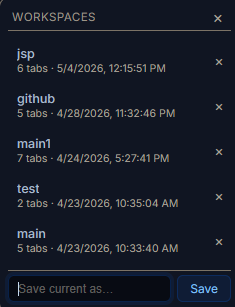
The current pane layout (tabs, splits, scroll positions, terminal state, search queries) auto-saves to localStorage on every mutation, surviving reloads. Named workspaces let you save snapshots on disk and reload them later: open the Workspaces popover from the sidebar footer, type a name, press Enter. Files live at ~/.config/gently/workspaces/<name>.json.
Where it reads from
| Provider | Source | Format |
|---|---|---|
| Claude | ~/.claude/projects/**/*.jsonl | JSONL |
| Codex | ~/.codex/sessions/**/*.jsonl | JSONL |
| Gemini | ~/.gemini/... | JSON (old) + JSONL (v0.39+) |
| OpenCode | ~/.local/share/opencode/opencode.db | SQLite (read-only) |
Override paths with CLAUDE_DIR, CODEX_DIR, GEMINI_DIR, OPENCODE_DB.
Claude. The first user message is often a synthetic environment-context block; Gently overrides the summary from ~/.claude/history.jsonl when a cleaner prompt is available. Usage in the TUI reads from ~/.claude/.credentials.json and calls Anthropic’s /api/oauth/usage.
Gemini. Supports both the old single-document .json format and the newer JSONL format. Resume requires the original project worktree to still exist on disk.
OpenCode. SQLite, opened read-only. The binary at ~/.opencode/bin/opencode is used as a fallback if opencode is not on $PATH.
Flags
python3 app.py [--host HOST] [--port PORT] [--open]
               [--tui | --no-tui] [--tmux-reset]
               [--view-only | --view-all | --trust]
--open auto-opens the browser. --tui / --no-tui force the dashboard on or off (default: on if stdout is a TTY). --tmux-reset kills every gently_* tmux session and cleans up log files, then exits.
Limitations
- Single user, LAN-accessible only (no auth, no TLS, use on trusted networks).
- Read-only viewer plus launcher; no editing of past messages.
- “Load full conversation” is synchronous and may freeze the UI for large sessions.
- Gemini resume requires the original project folder to still exist on disk.
- FTS5 index cold build is slow (~80s for 500+ sessions); subsequent searches are fast.